
Reading Your Vehicle with VCM Editor (HP Tuners)
Before we can build your custom tune, we need a stock read of your vehicle's factory calibration. Follow these steps exactly, then email the saved file to sales@n2speed.com with your name, order number, vehicle year/make/model and a list of your modifications.
CAUTION: Make sure the vehicle battery is fully charged before you start — we recommend keeping a battery charger/maintainer connected during the read. A power loss mid-read can leave a controller in an odd state. If communication is lost, VCM Editor will reset the module and prompt you to try again.
Read Procedure
- Connect your HP Tuners MPVI interface to a laptop with VCM Suite installed, then plug the device into the vehicle's OBD-II port.
- If VCM Scanner is open, close it before continuing.
- Open VCM Editor.
- If a tune file is already open, close it: File > Close.
- Turn the ignition to ON (RUN) — do not start the engine.
- Close all the doors and switch off every accessory (radio, HVAC, lights, phone chargers).
- In VCM Editor select Flash > Read Vehicle.
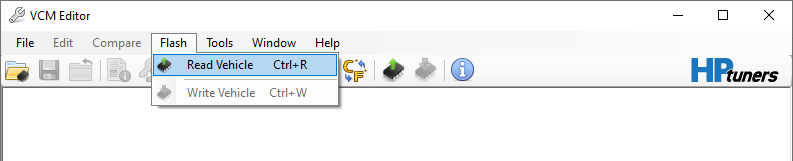
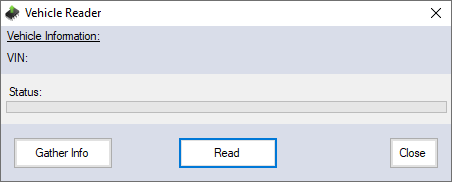
- When the Vehicle Reader window appears, wait 10–15 seconds, then click Read.
- Let VCM Editor read every controller until the status bar shows the read is complete. Do not touch the ignition, doors or accessories while it runs.
- Turn the ignition off and unplug the interface cable.
- The file opens automatically in VCM Editor. Select File > Save As and save it — name it something like LastName-2018-Charger-STOCK.hpt.
- Email that saved file to sales@n2speed.com. Questions? Call us at (954) 406-8550.
TIP: Always keep a backup copy of this first stock read. It is your way back to the factory tune later on.
Note: some 2015+ Dodge, Jeep and RAM PCMs must be unlocked before they can be read or written. See our PCM Unlock Service page. GM ECMs do not require unlocking.
Source: HP Tuners VCM Editor documentation — Reading a Vehicle.
Loading a Saved Configuration Channel List
To load a channel configuration that N2 Speed sent you and have saved to a file:
| 1. | In VCM Scanner Click the icon at the top of the Channels list. |
| 2. | Select Open Channel Config. |
| 3. | Browse for and select the saved channel config file that was sent to you. |
| 4. | Click Open. |
Controls and Special Functions Reset Adaptives
The Controls and Special Functions window allows you to instruct the vehicle to perform certain tasks in real time.
To open this window, do one of the following (while connected to the vehicle key on engine off)
In VCM Scanner:
| ■ | In the toolbar, click . |
| ■ | in the menu bar, select Vehicle > Controls & Special Functions. |
Functions available in this window will vary based on vehicle manufacturer, the controllers the vehicle contains, and the operating system version of those controllers.
Some of the functions that require special instructions are described below.
CAUTION: Although it is possible to instruct the vehicle controllers to perform any of the functions listed in this window, it's not always wise to do so. Executing certain functions at the wrong time can have unintended consequences - up to and including damaging the vehicle. Be aware of the effects of the function you are attempting to execute before you proceed.