
Loading a Saved Configuration Channel List
To load a channel configuration that N2 Speed sent you and have saved to a file, follow the steps below inside VCM Scanner.
In VCM Scanner, click the  toolbar button.
Select Open Channel Config from the dropdown menu that appears.
Browse to and select the saved channel config file that was sent to you by N2 Speed.
The file will typically have a .channels.xml or similar extension. Check the email or download folder where you saved it.
Click Open. VCM Scanner will now display the channels configured by N2 Speed for your specific vehicle and tune.
The channel configuration file tells VCM Scanner exactly which data parameters to log — things like RPM, MAP, fuel trims, knock counts, throttle position, and injector pulse width. Loading the N2 Speed config ensures your datalog captures everything we need to review your tune and make accurate calibration adjustments.
Without the correct channel list, your log may be missing critical data and could delay your tune revision.
Controls & Special Functions — Reset Adaptives
The Controls and Special Functions window allows you to instruct the vehicle to perform certain tasks in real time. This is where you reset adaptives, relearn idle, and execute other controller-level commands.
Opening the Controls & Special Functions Window
While connected to the vehicle (key on, engine off), open this window using either method below:
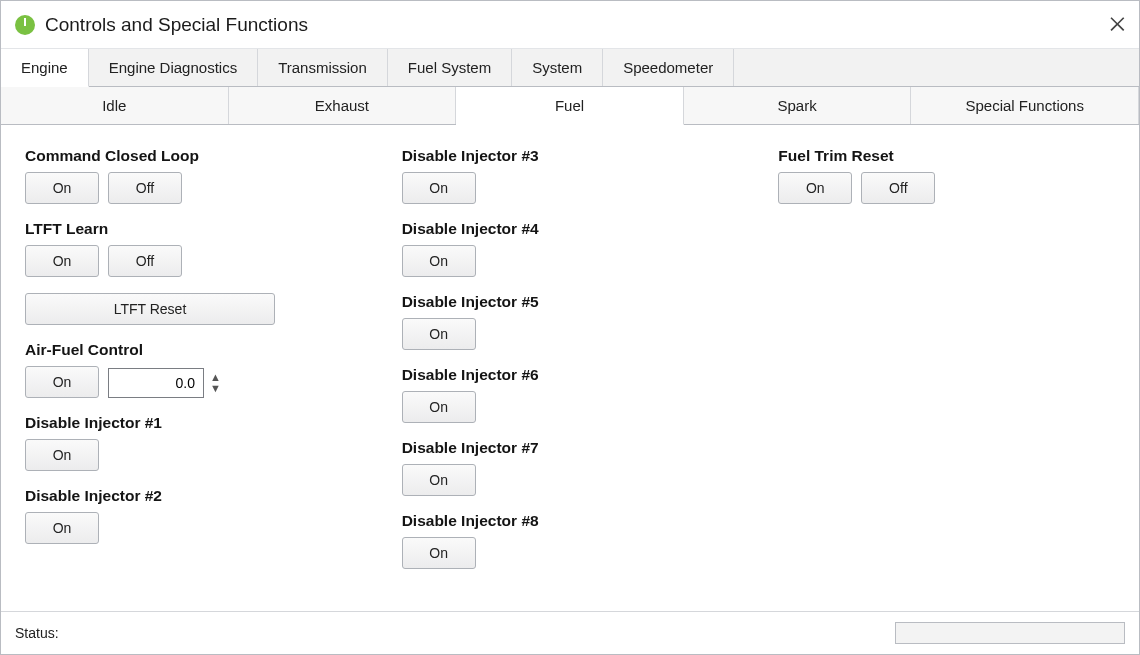
Functions available in this window will vary based on vehicle manufacturer, the controllers the vehicle contains, and the operating system version of those controllers. Not every function shown will be available on every vehicle.
Common functions include: reset fuel trims, reset idle learn, battery disconnect relearn, throttle body relearn, and transmission adaptive reset — depending on your platform (Dodge, GM, Ford).
Although it is possible to instruct the vehicle controllers to perform any of the functions listed in this window, it is not always wise to do so. Executing certain functions at the wrong time can have unintended consequences — up to and including damaging the vehicle. Be fully aware of the effects of the function you are attempting to execute before you proceed.
When & Why to Reset Adaptives
After loading a new tune file, resetting your fuel and transmission adaptives gives the PCM a clean slate to relearn based on the new calibration. Without a reset, old learned values from the previous tune can carry over and cause drivability issues, poor idle quality, or inaccurate fuel trims during the break-in period.
N2 Speed recommends resetting adaptives every time a significantly revised tune file is flashed — especially after changes to fueling, cam timing, or forced induction calibration. After the reset, drive the vehicle through a full warm-up cycle and several normal throttle events before logging.
If you are unsure whether to reset adaptives for your specific tune revision, contact N2 Speed and we'll advise based on what changed in your calibration.
Ready for Your Next Tune Revision?
Send us your datalog using the N2 Speed channel config and we'll dial in your calibration. Supercharged Dodge, GM, and more — precision remote tuning from real datalogs.
Frequently Asked Questions
Where do I find the channel config file N2 Speed sent me?
Check the email N2 Speed sent with your tune file — the channel config is usually attached alongside the tune. Save it to a location you can easily browse to from within VCM Scanner, such as your Desktop or a dedicated tuning folder.
What file format is the HP Tuners channel config?
HP Tuners VCM Scanner channel configurations are typically saved as .channels.xml files. They contain the list of parameters (channels) to be displayed and logged during a scan session.
Do I need to be connected to the vehicle to load a channel config?
No — you can load a channel configuration file at any time without being connected. However, you do need to be connected (key on, engine off or running) to use the Controls & Special Functions window and reset adaptives.
How long does it take for adaptives to relearn after a reset?
Basic fuel trim adaptives typically relearn within one or two full drive cycles. Idle relearn and transmission adaptives may take several drives covering a range of throttle positions and speeds. Drive normally — avoid wide-open throttle until the relearn is complete.
Can I reset adaptives with the engine running?
The Controls & Special Functions window requires key on, engine off for most reset commands. Some functions may be available with the engine running, but always verify what the function does before executing it — incorrect use can stall the engine or cause other unintended behavior.